Book a demo
SCCM to Intune

Moving off SCCM without losing what it gave you

Intune takes over device management. Eido gives you back the reporting, the inventory, the software metering and the live answers Configuration Manager teams relied on, with data minutes old, not hours.

Alongside Intune, not instead of it.
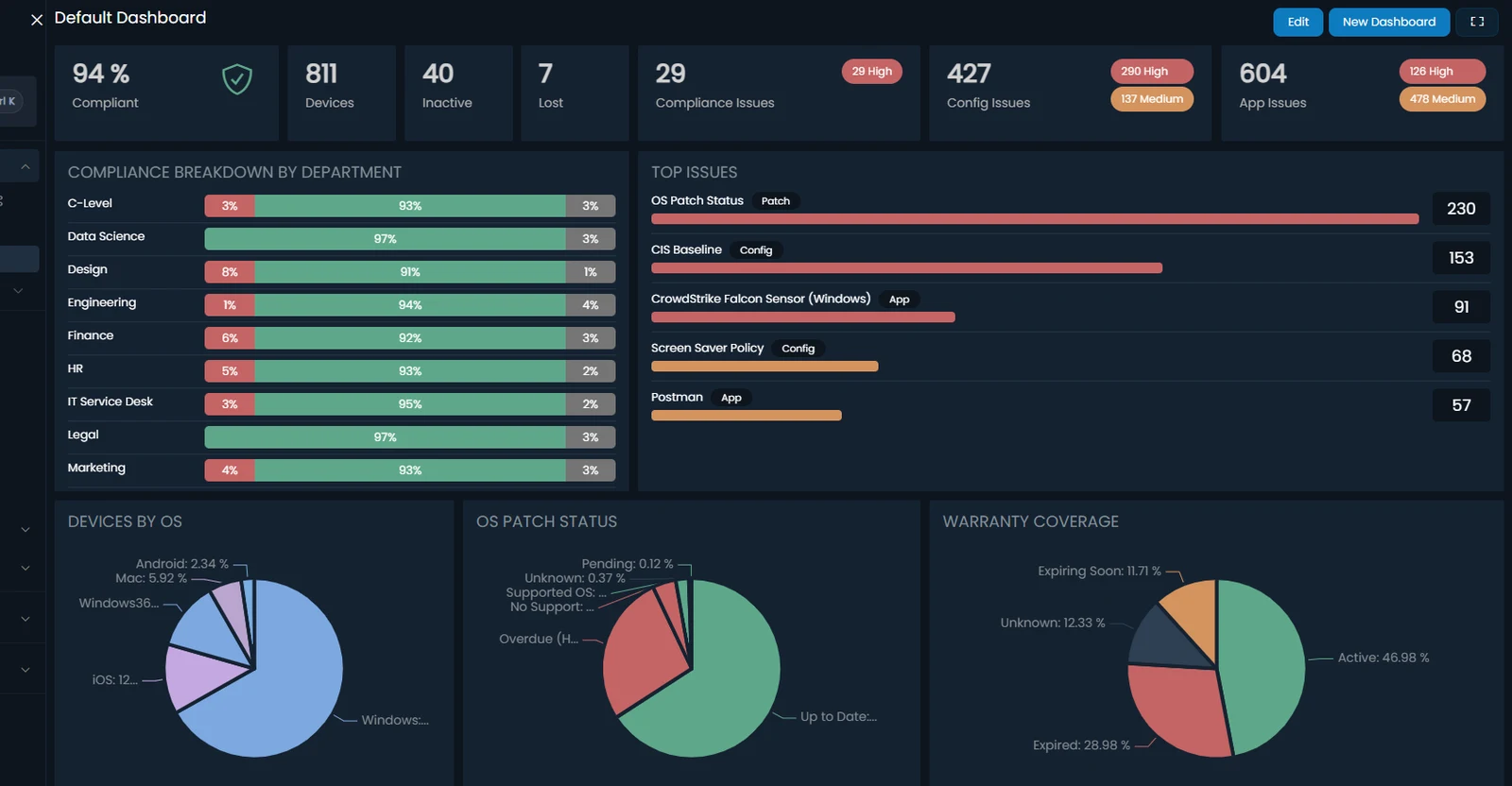
An Eido dashboard: compliance, device and issue tiles, compliance broken down by department, the top issues, and charts of devices by OS, patch status and warranty cover.
120+
Intune reports, ready the day you connect
350+
Inventory points on every Windows device
122
Paid apps ready to meter, no new agent
Up to 32x
Fresher inventory than Intune’s check-in

Trusted by teams delivering secure digital workplaces

  • Nerdio
  • EBF
  • Fyffes
  • Morrison
  • @GROUP
  • Premier Trailer Leasing
  • Buchanan Technologies
  • Artelia
  • The Children’s Society
  • UMB
  • ConXioN
  • Uniq
What changes after the move

Four things SCCM gave you, and how you get them back

A month after the move, somebody asks a question Configuration Manager used to answer in a report. Here is what changes, in Microsoft’s own documentation, and what Eido gives back.

With Configuration Manager Intune on its own Intune with Eido
Reporting With Configuration Manager Over 400 built-in reports in over 50 folders, and subscriptions that email a report on a schedule. Microsoft Learn Intune on its own One historical report, a 30-day compliance trend, and no scheduled delivery in the admin center. Microsoft Learn Intune with Eido 155 ready-made reports, more than 120 working the day you connect, 12 months of history, and any report emailed on a schedule or sent as a branded PDF. Intune reporting →
Inventory you can extend With Configuration Manager Hardware inventory you could extend by adding inventory classes from the console. Microsoft Learn Intune on its own A set list of Windows hardware and app properties, plus selected HKLM registry values, with the properties catalog. Microsoft Learn Intune with Eido 350+ inventory points on every Windows device with the Eido Client, refreshed as often as every 15 minutes, plus collections of your own from WMI, the registry, files or a PowerShell script. Live device intelligence →
Software metering With Configuration Manager Software metering of Windows desktop apps, with reports on which users ran each one. Microsoft Learn Intune on its own “At this time, Intune provides no running application detection.” Microsoft Learn Intune with Eido Who ran each app, on which device, on how many days and for how long. 122 paid apps ready to meter, and no new agent to install. Software metering →
Answers from the device, now With Configuration Manager CMPivot queried every connected device in a collection at once, and could hand the results to Run Scripts. Microsoft Learn Intune on its own Device query reads a Windows device’s state live. Fixing it means a reboot, a remediation script or a remote session. Microsoft Learn Intune with Eido Read and act from the device page: end a process, restart a service, clear a print queue, edit the registry. No remote session. Live tools →

See all four on your own Intune data, before the last SCCM report is switched off.

Reporting

The reports, back on day one

120+ Intune reports the day you connect, 12 months of history, and any report emailed on a schedule or sent to leadership as a branded PDF. Nothing to install or keep running: no report server, no Power BI project, no Graph API scripts.
  • Patch status on every platform, down to each patch on each device
  • Compliance, apps, Autopilot, policy settings and audit, joined to every device and user
  • Each team sees only its own devices, with no scope tags to maintain
Intune reporting →
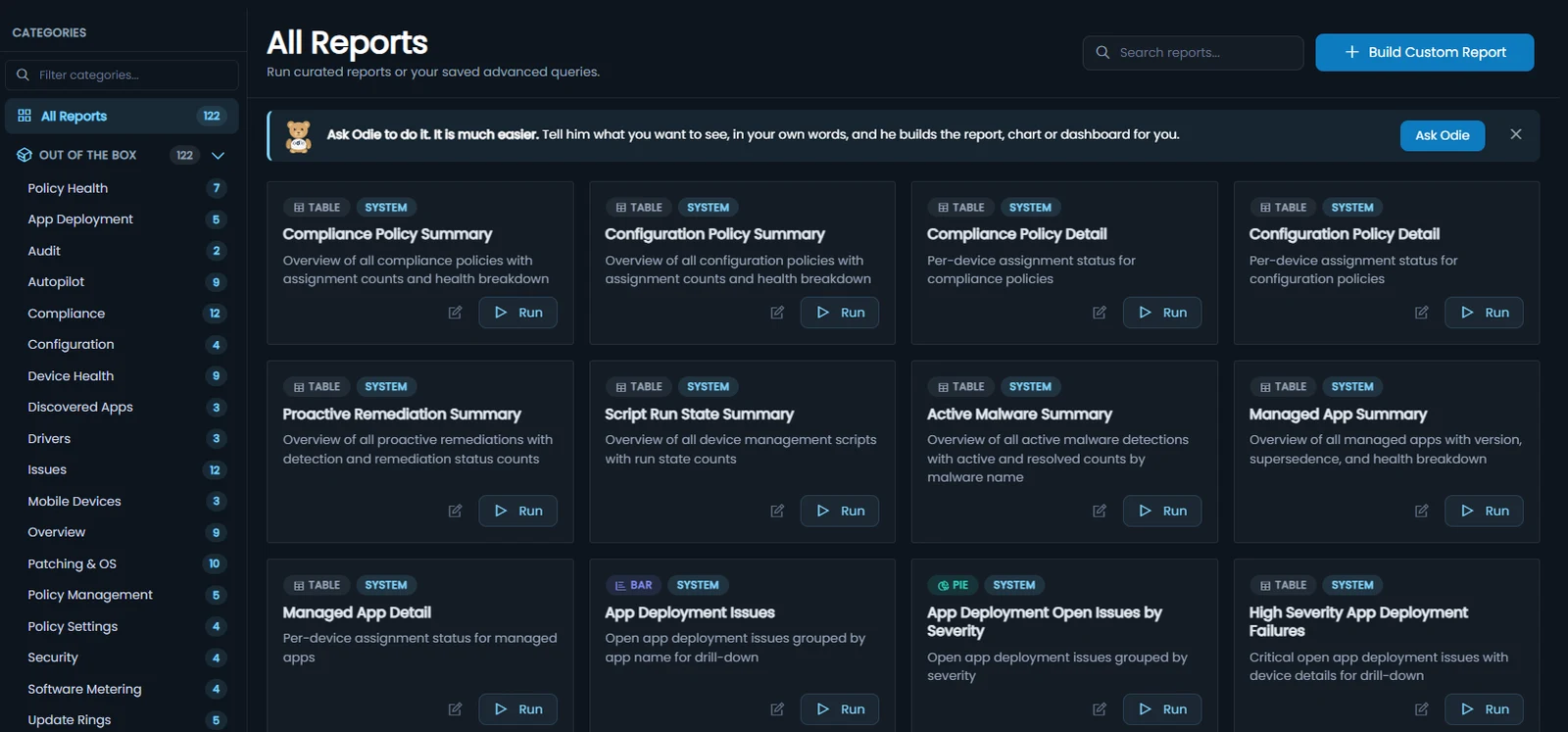
The report library in Eido: 122 reports in categories such as Policy Health, Patching and OS, and Software Metering, each a card with a Run button, under a banner inviting you to ask Odie instead.
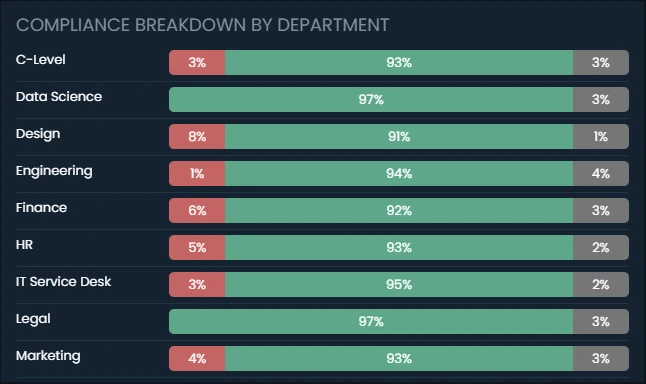
A dashboard widget in Eido: compliance broken down by department, each department a bar of failing, compliant and unknown devices.
The Odie assistant panel in Eido, offering to build reports, dashboards and workbooks.
Inventory and live answers

Answers from the device, minutes old

Intune checks in about every 8 hours (Microsoft Learn). With the Eido Client, inventory refreshes as often as every 15 minutes, and a device can be fixed from its page.

In one day, Intune's scheduled check-in happens about 3 times. At its fastest settings the Eido Client refreshes inventory up to 96 times, checks the event log 288 times and samples performance up to 28,800 times. One day on one Windows device. The Eido Client at its fastest settings; each tenant chooses its own. Intune’s scheduled check-in is about every 8 hours (Microsoft Learn), and some changes are pushed sooner.

350+ inventory points

Hardware, software, security and configuration on every Windows device, as often as every 15 minutes.

Inventory of your own

Collect anything else from WMI, the registry, files or a PowerShell script, and report on it like the rest.

Fix it from the device page

End a process, restart a service or clear a print queue, without a remote session.

Software metering

The software metering SCCM gave you, back

Who ran each application, on which device, on how many days and for how long. 122 paid apps are ready to switch on, and it runs through two Intune Remediations, so there is no new agent to install.

$33,000 a year 50 unused Microsoft Project Plan 5 licences at the $660 list price per user per year. An example, not a measurement: your own figure comes from your usage data.

Software metering for Intune →
App usage, last 30 days UsersAvg hours / user
  • Tableau Desktop 12 19.4
  • Adobe Photoshop 21 11.3
  • Microsoft Visio 26 10.4
  • Microsoft Project 14 10.4
  • Adobe Illustrator 13 10.1
  • Bloomberg Terminal 9 6
  • Autodesk AutoCAD 9 1.6

9 users, 1.6 hours each in a month. Worth a look before the renewal.

We reduced broken configuration policies, cut unused licences, and saved approximately $30,000.

The visibility Eido gave us changed everything.

Morrison Leo MIT Leader, Morrison Global

Keep the answers SCCM gave you. Book 15 minutes on your own estate.

The rest of Eido

There is more to Eido than the SCCM gaps

The same product, alongside Intune, in one place.

Complete patch status, on every platform

Windows, Windows 365, macOS, iPhone, iPad and Android in one view, graded against your own rules with update ring deferrals taken into account. Down to each patch on each device.

OS patch status by platform 811 devices
  • Windows 66% 28% 542
  • Windows 365 73% 27% 100
  • macOS 83% 17% 48
  • iPhone 65% 32% 82
  • iPad 75% 25% 20
  • Android 89% 11% 19

Undo the policy change that ruined Monday

A new version of every Intune policy each time it changes, every setting’s value over time, and a restore when a change goes wrong.
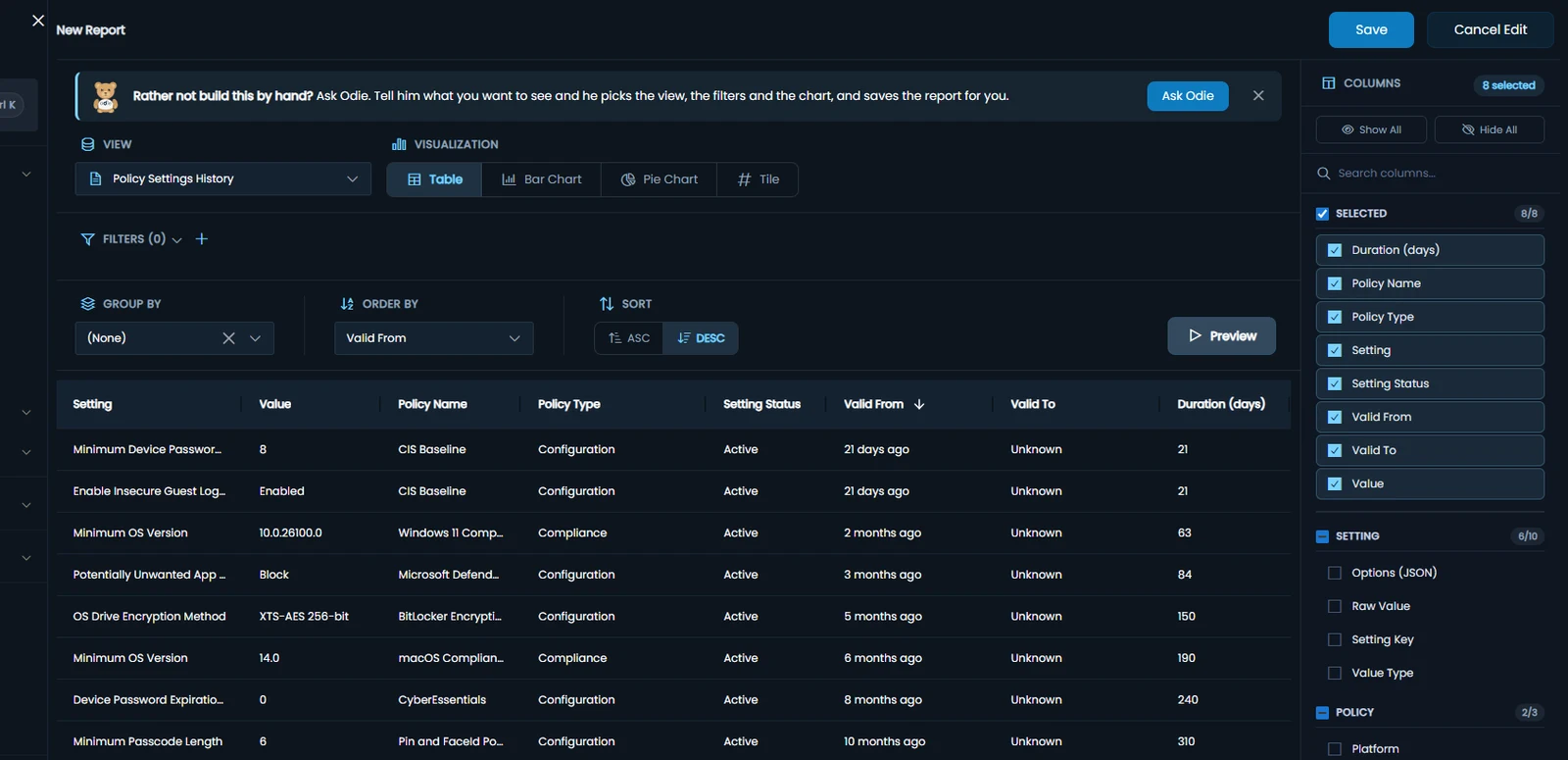
Policy settings history in Eido: each setting of each policy, its value, when that value took effect and how long it has held, such as minimum OS versions and BitLocker encryption methods.

Know why the laptop is slow before the ticket arrives

An experience score for every device, every night, with the reason behind it: the app, the network, the logon or the Intune change.

Experience score 77Fair 30-day average, 596 devices scored
  • Startup and logon 68
  • Performance 74
  • Network 81
  • Reliability 85
  • Device health 89

Intune changes that hurt experience

  • Win11 – Security Baseline Settings changed 7 Oct Worse Logons +38% 214 devices
  • Teams – Update Policy Assignments changed 6 Oct Worse Crashes +61% 88 devices

Each change compared with the rest of the tenant over the same days, so a bad Monday is not blamed on it.

Problems reach the service desk on their own

When an alert fires or an automation runs, Eido raises a ServiceNow incident with the device’s primary user as the caller, or posts to Teams, Slack, email or a webhook. ServiceNow SAM reads app usage from Eido.

No spreadsheets, and nobody copying anything across by hand.

Each team sees its own devices, without scope tags

Rules on real device and user attributes, such as department, office or device name, applied to every report and dashboard. No scope tags to set up or maintain.

Your Intune estate
  • London service desk Office is London
  • Mobile team OS is iOS, iPadOS
  • VIP support Department is C-Level
Each team sees only its own devices, in every report and dashboard.

See the product page for more →

FAQs

Questions from teams leaving SCCM

Does Intune have software metering like SCCM?

No. Intune reports which applications are installed, and in Microsoft’s own words: “At this time, Intune provides no running application detection.” (Microsoft Learn). Eido’s software metering shows who ran each application, on which device, on how many days and for how long. How it works.

Do we have to install an agent?

Not for reporting, history, scheduled reports or policy backups, which read Intune itself. Software metering needs no new agent either: it runs through two Intune Remediations. The Eido Client, which most teams deploy through Intune, adds what happens on the device itself: inventory as often as every 15 minutes, your own inventory, events, performance and the live tools.

Does Eido work while we are still co-managed?

Yes. A co-managed device is enrolled in Intune as well as Configuration Manager, so its statuses in Eido are real results. A device managed by Configuration Manager alone reads Unknown for compliance, configuration and apps rather than failed, because Intune has no results for it, and it still gets a real patch grade.

Move to Intune and keep the answers

In 15 minutes we will show you the reports, the inventory, software metering and the live tools, on Intune data.

Book a demo

A 15-minute look at Eido on the Intune problems you have today. Pick a time that suits.

Form not loading? Open it on its own page.

Request a trial

Connect your own tenant and try every feature, Software Metering included. No credit card required.

Form not loading? Open it on its own page.