











Book a demo
Intune reporting built for enterprises

Stop scripting the answers Intune should give you

120+ ready-made Intune reports the day you connect, patch status on every platform, 12 months of history and reports that send themselves. Skip Power BI. Skip the Graph API.

Free trial, no credit card required.

120+
Intune reports, ready the day you connect
6
Platforms with complete patch status
12months
Of history, where Intune keeps 30 days

Trusted by teams delivering secure digital workplaces

  • Nerdio
  • EBF
  • Fyffes
  • Morrison
  • @GROUP
  • Premier Trailer Leasing
  • Buchanan Technologies
  • Artelia
  • The Children’s Society
  • UMB
  • ConXioN
  • Uniq
The DIY route

Skip Power BI. Skip the Graph API.

“How many devices are missing this month’s patch?” With Intune on its own, a proper answer is a project, and keeping it working is somebody’s job.

The DIY route

  1. Register an app in Entra ID
  2. Grant it Graph API permissions
  3. Write a script that pages through the results
  4. Build a Power BI model on top
  5. Schedule the refresh
  6. Fix it when it breaks

Then do it again for the next question.

With Eido

  1. Connect your tenant
  2. Open the report

122 reports work the day you connect

Connecting a tenant takes about five minutes. Nobody on your team maintains the plumbing.

65% of Intune professionals spend 6 to 15 hours a week on manual tasks such as packaging, patching, troubleshooting and reporting. Recast Software, State of Intune 2026, 890 respondents.

Query Hub

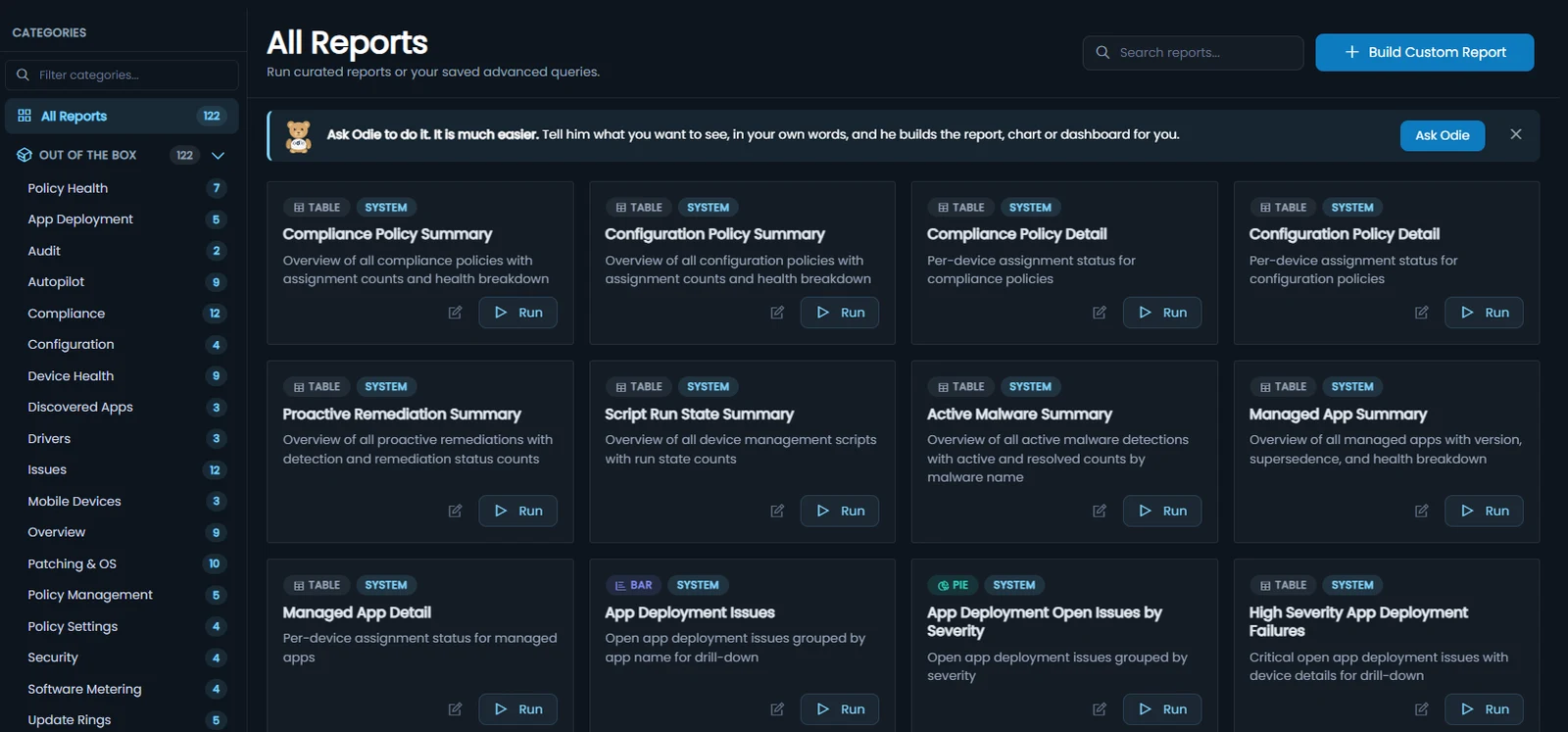
120+ Intune reports, ready the day you connect

Compliance, patching, apps, Autopilot, policy settings, audit and more, joined to every device, user and Entra group. Run one as it is, filter it, chart it or put it on a dashboard. No query language and no data model to build.

  • Compliance 12
  • Issues 12
  • Patching & OS 10
  • Users 10
  • Autopilot 9
  • Device Health 9
  • Overview 9
  • Policy Health 7
  • App Deployment 5
  • Policy Management 5
  • Update Rings 5
  • Configuration 4
  • Policy Settings 4
  • Security 4
  • Software Metering 4
  • Discovered Apps 3
  • Drivers 3
  • Mobile Devices 3
  • Audit 2
  • Warranty 2

Plus 33 Digital Experience reports with the Eido Client: 155 in all.

The report library in Eido: 122 reports in categories such as Policy Health, Patching and OS, and Software Metering, each a card with a Run button, under a banner inviting you to ask Odie instead.
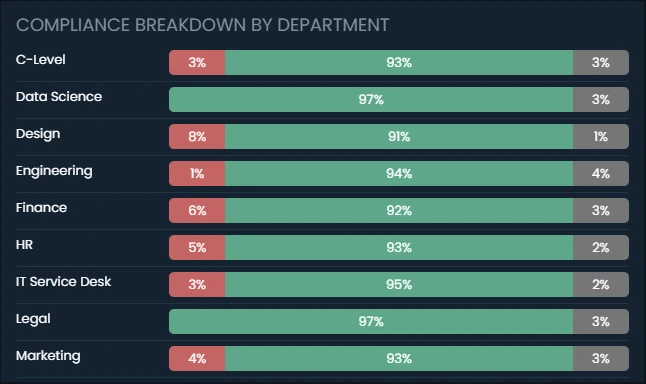
A dashboard widget in Eido: compliance broken down by department, each department a bar of failing, compliant and unknown devices.
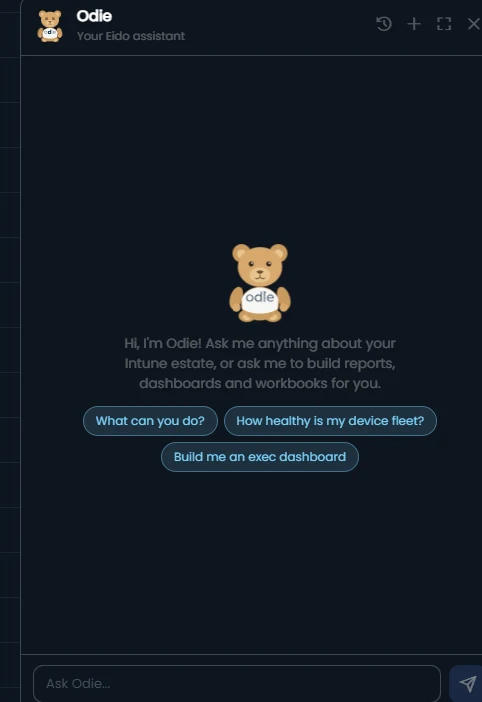
The Odie assistant panel in Eido, offering to build reports, dashboards and workbooks.

See the reports run on your own Intune data.

Complete patch status for Intune

Every platform. Every device. Every patch.

Windows, Windows 365, macOS, iPhone, iPad and Android in one view, graded against your own rules. Full visibility of your Intune estate, down to each patch on each device.

  • A status for every device, from Up to Date to Overdue (High), and No Support when its OS version is out of vendor support
  • Every patch on a device, installed, pending or overdue, down to the KB on Windows
  • Update ring deferrals taken into account, so nobody chases a patch a device has not been offered
  • iPhones and iPads judged against what their hardware can run
OS patch status by platform 811 devices
  • Windows 66% 28% 542
  • Windows 365 73% 27% 100
  • macOS 83% 17% 48
  • iPhone 65% 32% 82
  • iPad 75% 25% 20
  • Android 89% 11% 19
Up to DatePendingOverdue (Medium)Overdue (High)No Support
History

12 months of history, not 30 days

Your auditor asks about March. Eido has every day of the last 12 months, down to the devices that were failing on it, so the answer is already there.

Intune’s one historical report is a 30-day device compliance trend (Microsoft Learn). Eido keeps daily scores for compliance, configuration, apps and patching. Your history starts the day you connect.

We reduced broken configuration policies, cut unused licences, and saved approximately $30,000.

The visibility Eido gave us changed everything.

Morrison Leo MIT Leader, Morrison Global

Have the answer before the auditor finishes asking.

Scheduled reports

Reports that send themselves

Build the monthly pack once. It lands in leadership’s inbox on the 1st with this month’s numbers, and nobody exports a dashboard by hand again.

  • Any report, on a schedule

    Emailed every day, week or month to the people who ask for it, so the question never reaches you.

  • Workbooks for leadership

    Branded PDF reports from live data, with your logo, a cover page and charts. Schedule one for the 1st of the month and the pack builds itself.

  • Or ask Odie

    “Email me the devices that have not synced for 30 days, every Monday.” Odie, Eido’s built-in assistant, saves the report and sets the schedule.

Intune on its own has no scheduled delivery in the admin center (Microsoft Learn).

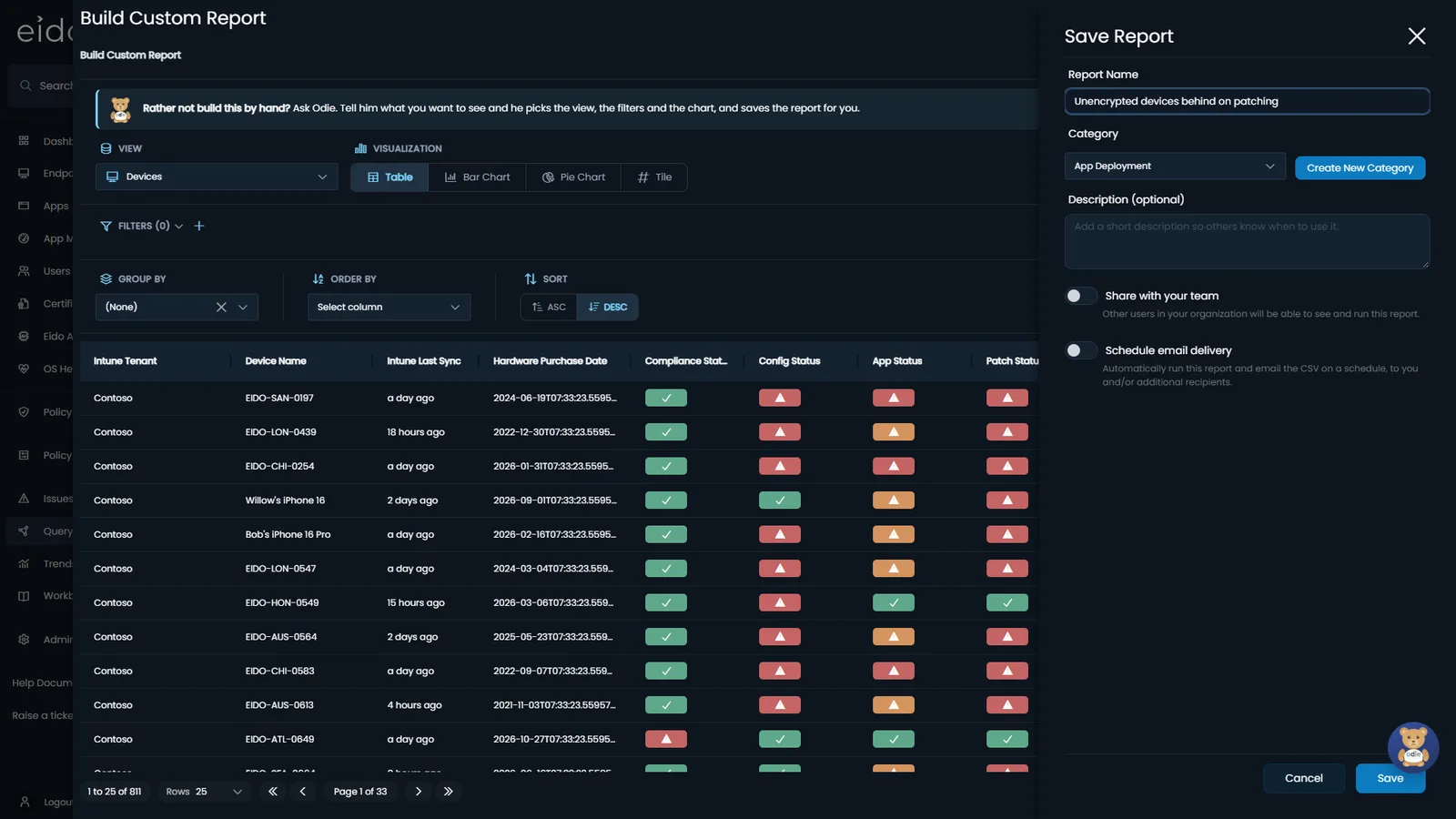
Saving a report in Eido: the report's name and category, a switch to share it with your team, and a switch to schedule email delivery, which runs the report and emails it on a schedule.
Built for enterprises

Your teams, your rules, your service desk

Your Intune estate
  • London service desk Office is London
  • Mobile team OS is iOS, iPadOS
  • VIP support Department is C-Level
Each team sees only its own devices, in every report and dashboard.

Access by department, office or device name, not scope tags

Give the London service desk London, the VIP team the executives and each region its own devices. Rules on real device and user attributes, applied by Eido to every report and dashboard, with no scope tags to set up or maintain.

No spreadsheets, and nobody copying anything across by hand.

ServiceNow, both ways

When an alert fires or an automation runs, Eido raises a ServiceNow incident, assigned to the right group, with the device’s primary user as the caller. When an alert’s issue clears, Eido says so on the same incident.

ServiceNow Software Asset Management reads monthly app usage from Eido, and sends Eido the reclamation rules it wants measured. No spreadsheet in between.

  • Read-only access to Intune for reporting
  • Your data held in the region you choose: UK, EU or US
  • ISO 27001, ISO 9001 and Cyber Essentials certified

Bring your teams, your rules and your service desk. We will show you on your own Intune data.

The rest of Eido

There is more to Eido than reporting

The same product, alongside Intune, in one place.

Device data from minutes ago, not hours

Intune checks in about every 8 hours. With the Eido Client, inventory refreshes as often as every 15 minutes, up to 32x fresher, and a device can be fixed from its page without a remote session.

In one day, Intune's scheduled check-in happens about 3 times. At its fastest settings the Eido Client refreshes inventory up to 96 times, checks the event log 288 times and samples performance up to 28,800 times. One day on one Windows device. The Eido Client at its fastest settings; each tenant chooses its own. Intune’s scheduled check-in is about every 8 hours (Microsoft Learn), and some changes are pushed sooner.

Know why the laptop is slow before the ticket arrives

An experience score for every device, every night, with the reason behind it: the app, the network, the logon or the Intune change.

Experience score 77Fair 30-day average, 596 devices scored
  • Startup and logon 68
  • Performance 74
  • Network 81
  • Reliability 85
  • Device health 89

Intune changes that hurt experience

  • Win11 – Security Baseline Settings changed 7 Oct Worse Logons +38% 214 devices
  • Teams – Update Policy Assignments changed 6 Oct Worse Crashes +61% 88 devices

Each change compared with the rest of the tenant over the same days, so a bad Monday is not blamed on it.

See who opens every paid app, before you renew it

Intune knows where an app is installed, not who uses it. Eido shows who ran each app, on how many days and for how long, so a renewal is a decision, not a guess. No new agent to install.

App usage, last 30 days UsersAvg hours / user
  • Tableau Desktop 12 19.4
  • Adobe Photoshop 21 11.3
  • Microsoft Visio 26 10.4
  • Microsoft Project 14 10.4
  • Adobe Illustrator 13 10.1
  • Bloomberg Terminal 9 6
  • Autodesk AutoCAD 9 1.6

9 users, 1.6 hours each in a month. Worth a look before the renewal.

Undo the policy change that ruined Monday

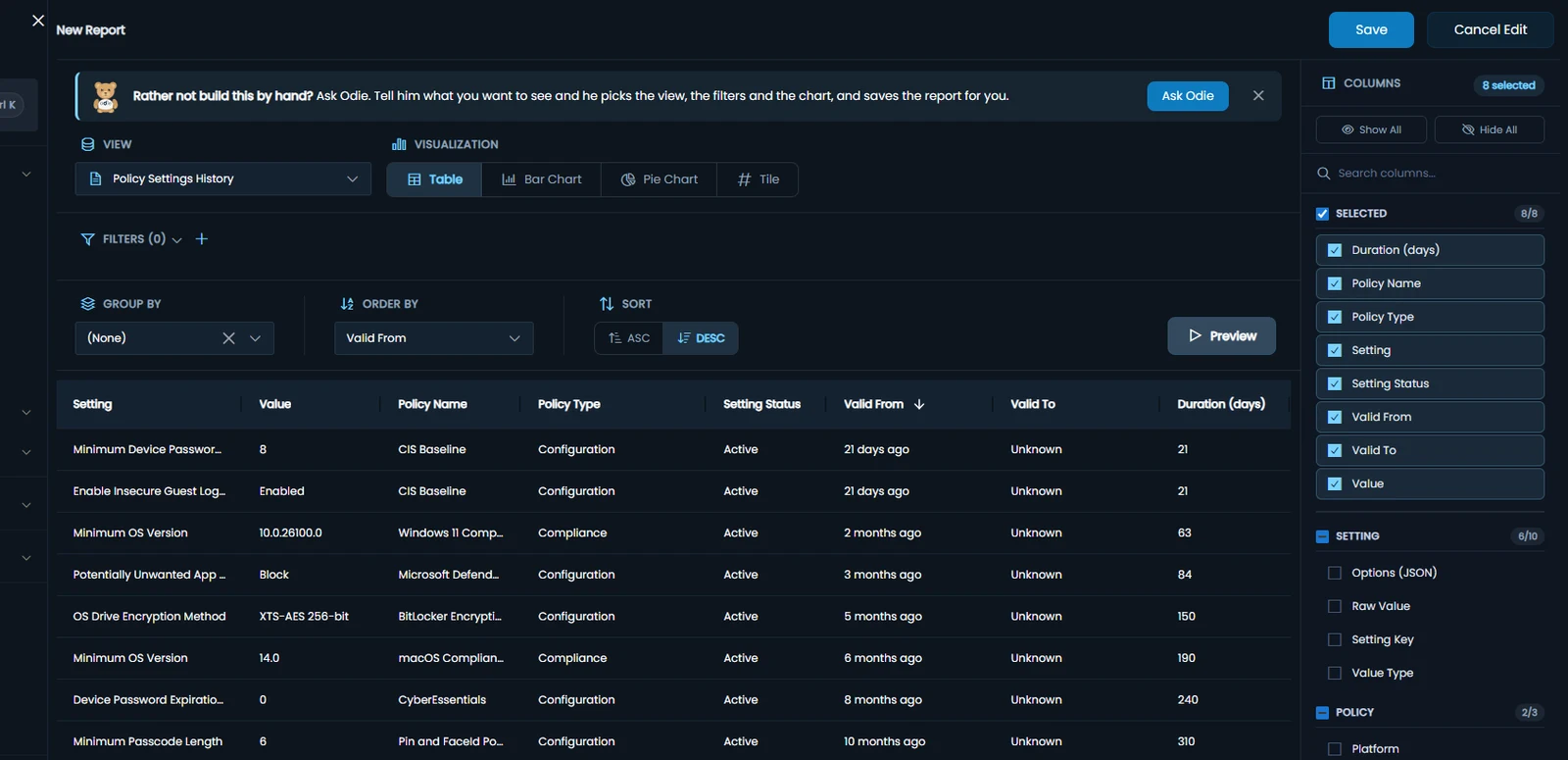
A new version of every Intune policy each time it changes, every setting’s value over time, and a restore when a change goes wrong.

Policy settings history in Eido: each setting of each policy, its value, when that value took effect and how long it has held, such as minimum OS versions and BitLocker encryption methods.

See the product page for more →

FAQs

Questions about Intune reporting

Do I need Power BI or Graph API scripts?

No. Eido syncs your Intune data for you, and more than 120 reports work the day you connect. Build your own in a few clicks, without a query language. If you still want the data in Power BI or a data warehouse, export jobs send it to your own Azure storage on a schedule.

How far back does the history go?

12 months, day by day, down to the devices affected on any day. The history starts the day you connect your tenant, so the sooner you connect, the more of it you have.

Does Eido change anything in Intune?

Not for reporting. Reporting needs read-only access, and Eido never changes your tenant in the background. It writes to Intune only when an administrator restores a policy or deploys a policy template. The documentation lists every permission.

See your own Intune data in Eido

In 15 minutes we will run the reports you rebuild by hand today, on your own estate. Or request a trial and connect your tenant yourself.

Book a demo

A 15-minute look at Eido on the Intune problems you have today. Pick a time that suits.

Form not loading? Open it on its own page.

Request a trial

Connect your own tenant and try every feature, Software Metering included. No credit card required.

Form not loading? Open it on its own page.