Explore Eido
Everything Eido adds to Microsoft Intune: reporting that is ready on day one, devices you can see and fix in real time, and the detail your engineers will ask about.
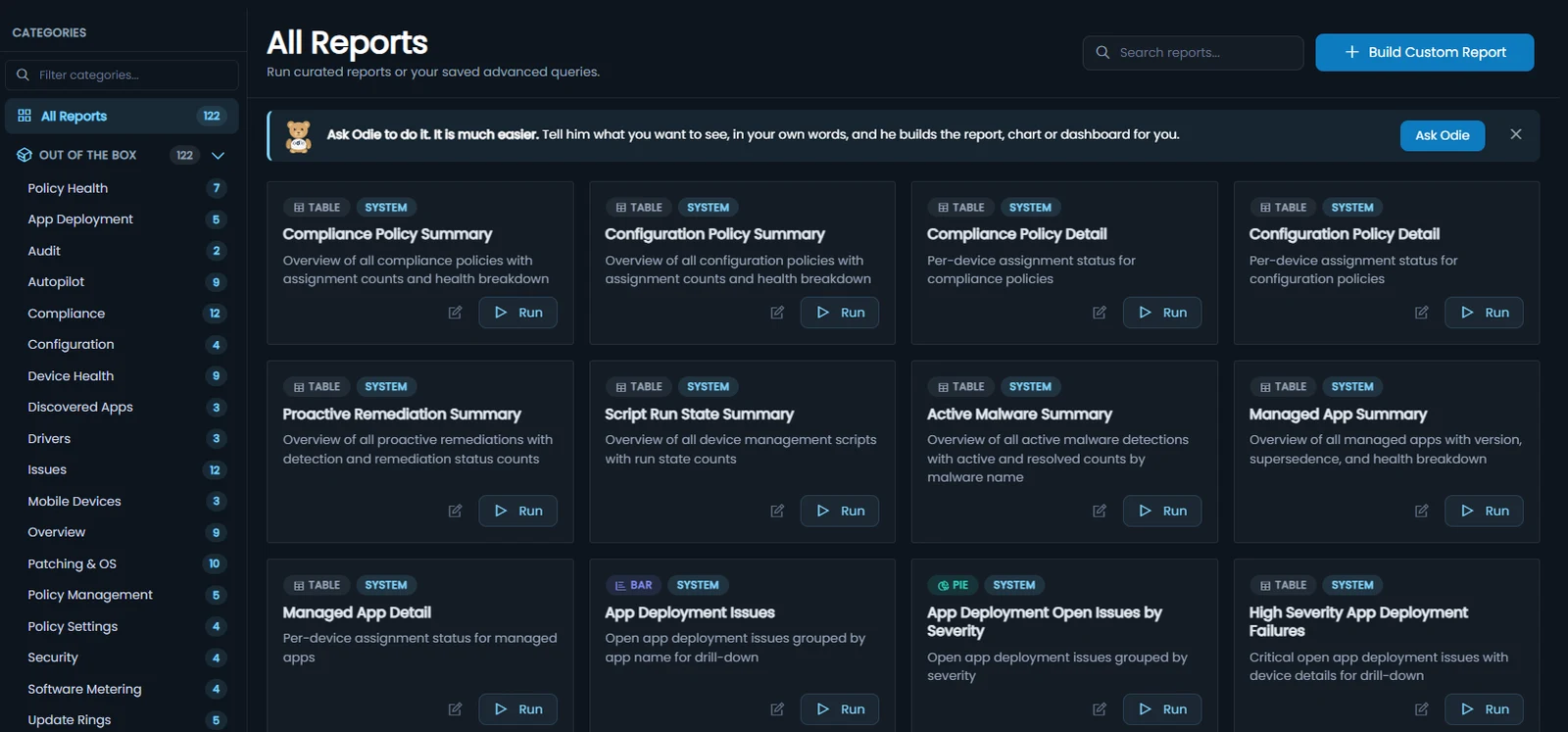
120+ reports on day one. Build the rest in minutes.
Patch status, compliance, software, policy history, Defender, Autopilot and audit logs, joined up and filterable by any device, user or Entra ID group.
Time back. A patch or compliance report that used to mean Graph API queries and a Power BI model is a saved report, ready to run, share or schedule.
- Under the hood
- Views
- 81, from Devices and Users to Policy Settings History
- Fields
- 1,000+ to filter, group, sort and chart
- History
- 12 months of trends, down to a single day
- Charts
- Table, bar, pie and tile, with drill-down
- Out
- Branded PDF workbooks, scheduled email, CSV, and CSV or JSON to your own Azure storage
- Your logic
- Computed columns, with a documented formula language
- Audit
- Devices that left Intune, kept a year with their last details; every EPM elevation; Remote Assistance sessions per device
-
Query Hub
The reporting engine, with more than 120 ready-made reports to run, adapt and save.
Read the docs -
Build your own
Pick a view, add filters and columns, and show the answer as a table, bar chart, pie chart or tile.
Read the docs -
Dashboards
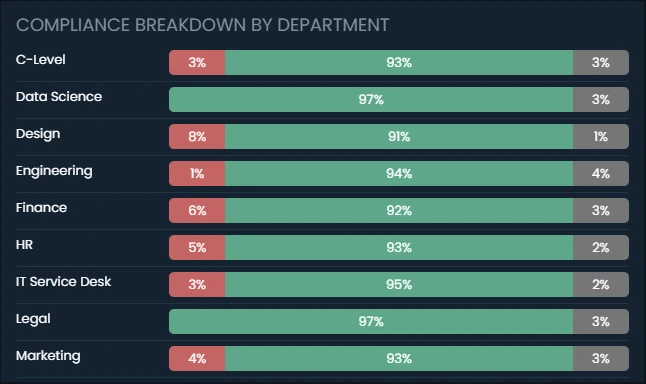
Focused views for executives, patching, apps or compliance. Click a widget to see the devices behind it.
Read the docs -
Trends
12 months of history by category, policy and app, down to the devices affected on any one day.
Read the docs -
Workbooks
Scheduled, branded PDF reports built from live data, sent to the people who need them.
Read the release note -
Wallboards
A rotation of dashboards on a shared screen, paired with a six-digit code.
Read the docs -
Computed columns
Add your own formula columns to any view, with a builder and a documented formula language.
Read the docs -
Export jobs
Send whole views to your own Azure storage on a schedule, as CSV or JSON, for your data warehouse or SIEM.
Read the docs -
Share and schedule
Share reports and dashboards with your team. Have table reports emailed as CSV, or workbooks as PDF, every day, week or month.
Read the docs
Real time, not eight hours ago
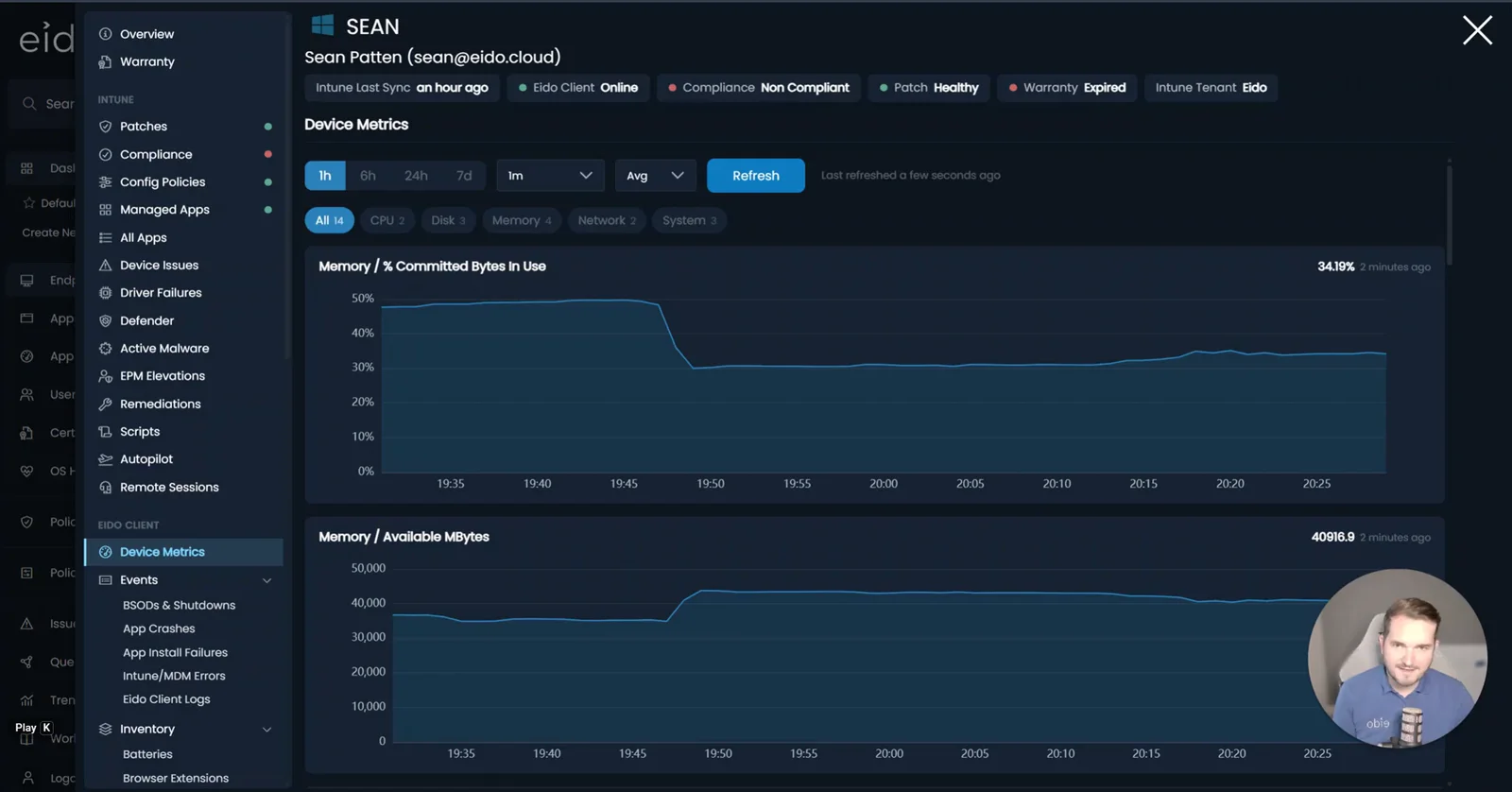
Intune’s scheduled check-in comes round about every eight hours. The Eido Client samples performance as often as every 3 seconds, reports crashes and blue screens every 5 minutes, and refreshes inventory as often as every 15 minutes.
Time back. Diagnose an intermittent fault while it is happening, instead of waiting for a check-in or asking the user to make it happen again.
- Under the hood
- Performance
- Any Windows performance counter, sampled as often as every 3 seconds and charted by the minute (min, average, max) for 7 days
- Events
- Crashes and hangs, blue screens, unexpected shutdowns, MDM errors and app install failures, every 5 minutes
- Inventory
- 350+ data points across 32 areas, as often as every 15 minutes, only what changed is sent
- On demand
- A refresh button on each inventory page asks the device to check again now
- Event history
- 12 months, searchable across the whole fleet in Query Hub
- Network
- Outbound only: HTTPS, plus Azure IoT Hub (8883, falling back to 443) for live metrics and live tools
- Deployment
- An MSI, usually a Win32 app through Intune. An RMM tool or a script works too
- Identity
- A one-time enrolment token, then a non-exportable certificate per device
-
Live performance
CPU, memory and disk while the problem is happening, from a gallery of common counters or any Windows counter you name.
Read the docs -
Events every five minutes
Application crashes and hangs, blue screens, unexpected shutdowns, MDM errors and app install failures, with the device context attached.
-
Deep inventory
System, disks and BitLocker, TPM and Secure Boot, memory, battery, network, Wi-Fi, proxy, printers and more.
-
Software, in detail
Every installed app and version, runtimes, services, startup items, browsers, Office and OneDrive health.
-
Security posture
Defender, firewall profiles, certificates, local users and admins, browser extensions graded by the permissions they ask for, and Linux distributions, Kali included, under WSL.
-
Windows 11 readiness
Whether each device’s processor, TPM and firmware can take Windows 11, with the reason when it cannot.
Fix it without remoting in
Open the device, see what is wrong and act from the same page, without taking over the user’s screen.
Time back. Restart a service or clear a print queue in seconds, with no remote session to arrange and no user to interrupt.
- Under the hood
- Tools
- Nine, from Intune Doctor to network diagnostics, acting instantly
- Write actions
- Off by default, switched on per Intune tenant, area by area
- Risky actions
- A fresh Entra ID sign-in first
- Refusal list
- Defender, the firewall and critical system processes are never touched
- Audit
- Every action logged: who ran it, on which device, and when
- Circuit breaker
- An unusual burst of write actions freezes them for that person or tenant until cleared
-
Intune Doctor
Diagnose Intune enrolment health and trigger an OMA-DM sync.
-
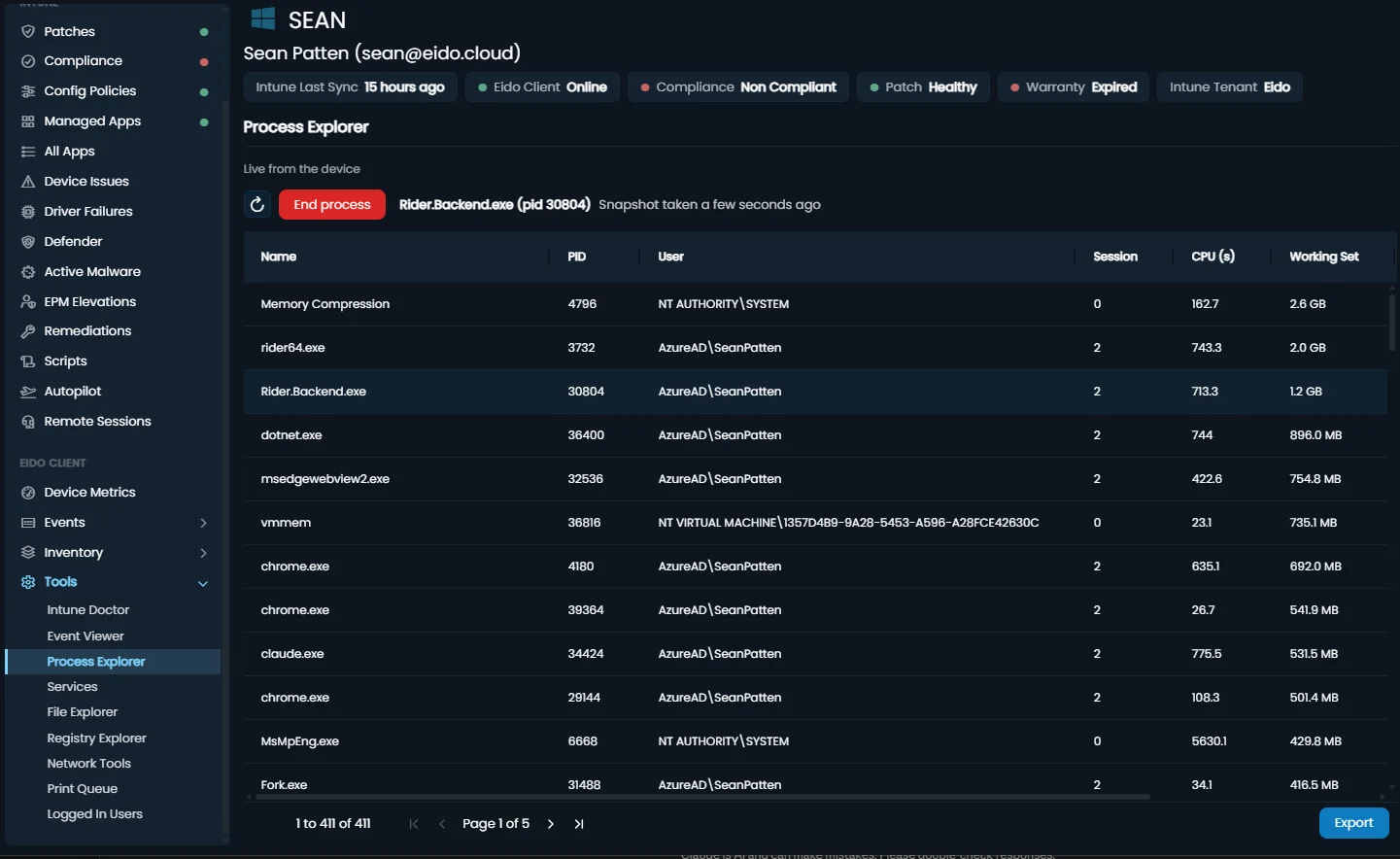
Process Explorer
See every running process and end the one that is stuck.
-
Services
Start, stop and restart Windows services.
-
Registry Explorer
Browse and edit the registry, and create or delete keys and values.
-
Event Viewer
Browse and query any Windows event log channel.
-
File Explorer
Browse the file system, read-only.
-
Print Queue
See the queue, cancel a job or purge the lot.
-
Logged-in users
See who is signed in, and disconnect or log off a session.
-
Network tools
Ping, traceroute, DNS lookup and netstat, run from the device.
-
AI diagnostics
Eido AI investigates a service desk ticket on the user’s device, reports what it found, and suggests a fix for a person to approve. Works on ServiceNow incidents, with Eido AI switched on.
Read the docs -
Approved scripts only
AI diagnostics runs verified scripts from a controlled library, never a free command line. Every run is logged, and fixes are rate-limited.
Read the docs -
Built for a security review
How sign-in, access and device actions are controlled, written for the people who sign them off.
Read the docs
Every device graded. The right people told.
Each device is graded on compliance, configuration, apps and patching. When something goes wrong, Eido opens an issue, tells the right team where they already work, and tells them again when it is fixed.
Time back. Start the day with the devices that need you, worst first, while problems reach the right queue by themselves.
- Under the hood
- Categories
- Compliance, configuration, apps and patching
- Grades
- Healthy, Unhealthy medium, Unhealthy high, Unknown
- Rule
- A device is as bad as its worst category
- Issues
- Opened and resolved automatically, with start and end times
- Destinations
- Email, Slack, Microsoft Teams, webhooks and ServiceNow incidents
- Noise
- One alert when an issue opens, not one per sync
- Co-management
- Configuration Manager-only devices read Unknown, not failed, and still get a real patch grade
-
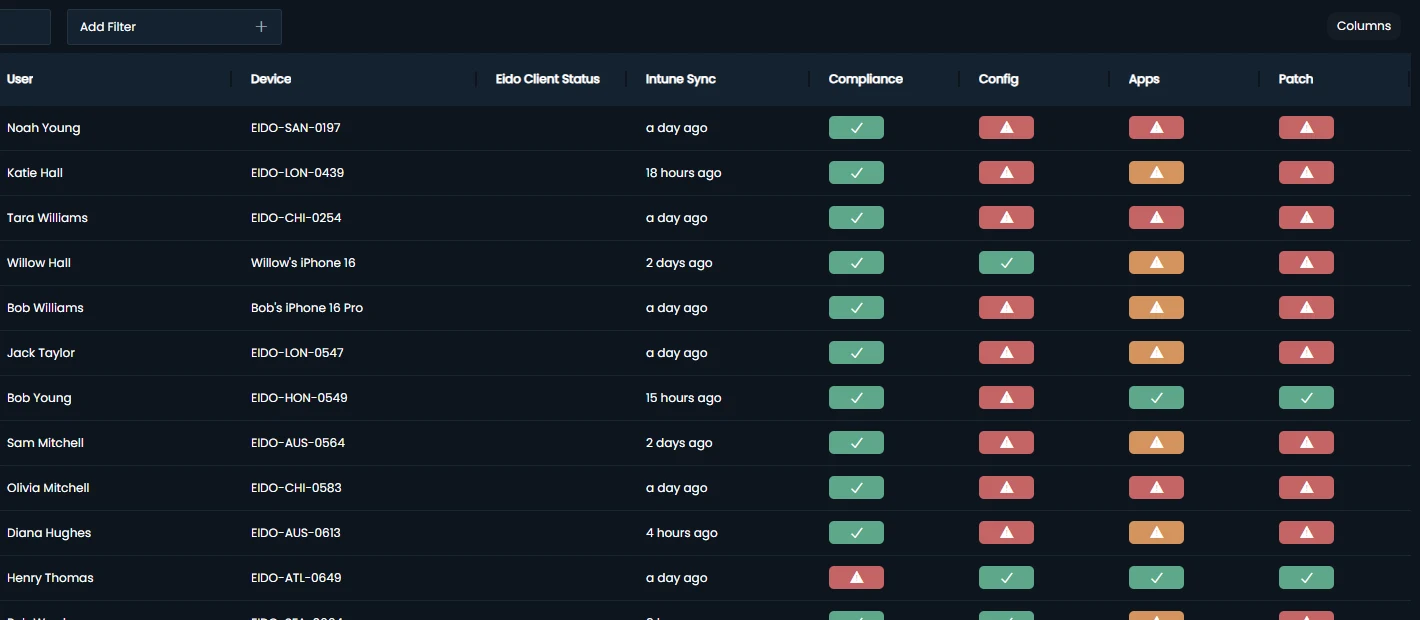
Endpoints
Every device synced from Intune, with its user, its last check-in and its four grades. Sort and filter to find the worst.
Read the docs -
Device details
Everything Eido knows about one device, from its hardware and patches to every policy and app assigned to it.
Read the docs -
Issues
Every device failing a policy, an app or patching, and for how long. Issues open and close themselves.
Read the docs -
You set the severity
Each policy and app can count as medium, high or be ignored, or be graded status by status, so the grades reflect what matters to you.
Read the docs -
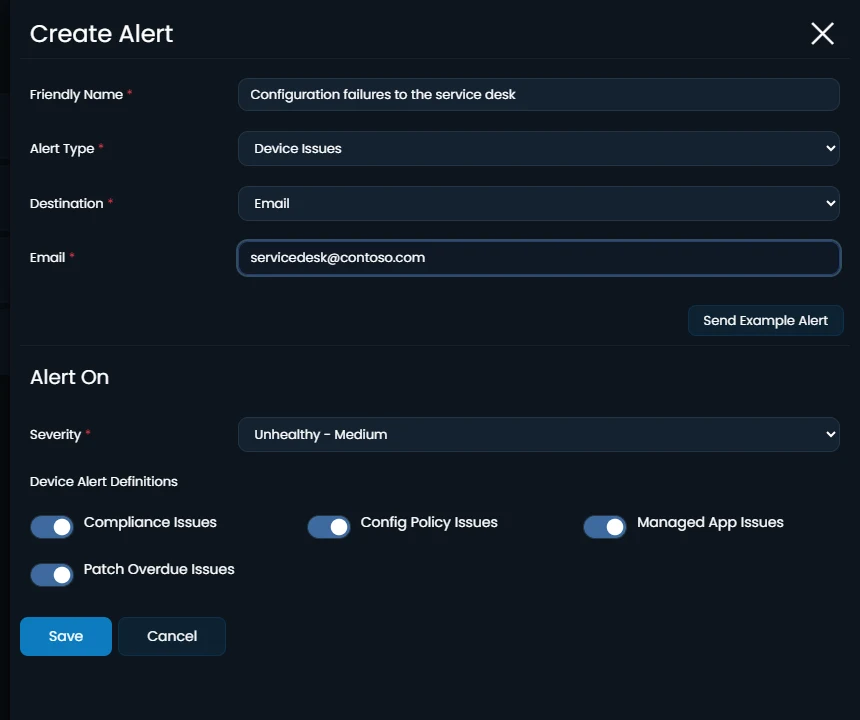
Alerts
An email, a Slack or Teams message, a webhook call or a ServiceNow incident when Eido raises or clears an issue.
Read the docs -
ServiceNow incidents
Incidents created and assigned automatically, and updated again when the issue clears.
Read the docs -
Automations
Watch any Query Hub view and act when rows start matching or a count crosses a line.
Read the docs -
Apple certificates and tokens
Warnings before Apple push certificates, VPP and enrolment tokens expire.
Read the docs -
Global search
Find a device, person, policy, app or screen from anywhere in Eido with one shortcut.
Read the docs
Ask in a sentence. Get a report, a chart or a dashboard.
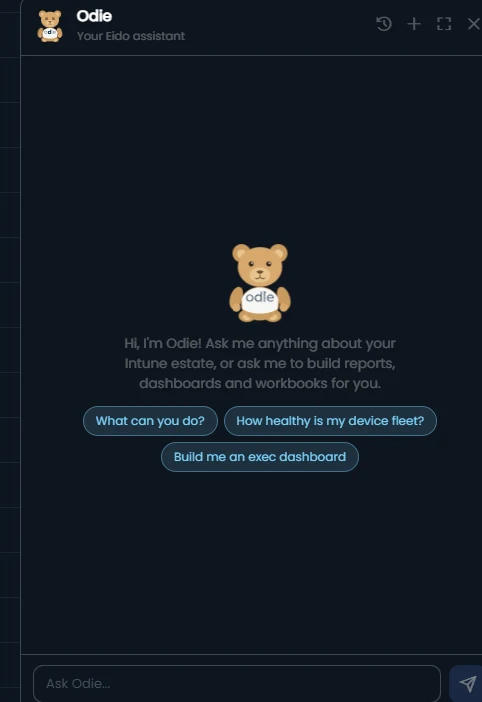
Odie, the bear in the corner of every page, builds what you would otherwise build by hand, from your own Intune data and under your own permissions.
Time back. Describe the report you need instead of building it.
- Under the hood
- Data
- Your Intune, Entra, Defender, Autopilot and audit data, plus Eido Client data where enabled, under your own role
- Builds
- Answers, reports, charts, dashboards, workbooks and scheduled email
- Grounding
- Looks answers up in your data and in the help centre, and shows each query he ran
- Control
- Read-only: he cannot change devices or Intune. An administrator can switch him off
Things people type
- How many devices are not encrypted?
- Which department has the most unhealthy devices?
- Devices that have not synced for a month
- How many devices do we have, by operating system?
- Show that as a pie chart
- Put that on a dashboard
-
Plain English
Say what you want to see. He works out where it lives and looks it up.
Read the docs -
Builds the real thing
A count, a list, a chart, a whole dashboard or a workbook, as ordinary reports you can change by hand.
Read the docs -
Your permissions
He sees the tenants and data your role allows and nothing else. What he builds is private until you share it.
-
Asks when it matters
Before a large build, or when a request could mean two things, he checks with you first.
-
Knows the documentation
Ask how Eido works and he answers from the help centre, with a link to the article he used.
-
Your call
An administrator decides whether Odie appears at all, and nobody can read another person’s conversations.
Read the docs
Every platform, measured against your own rules
Windows, macOS, iOS, iPadOS and Android, with the vendor’s end-of-life date for each OS version and warranty dates for Dell, HP and Lenovo devices.
-
 Windows
 - Windows 365
-
 macOS
macOS - iOS
- iPadOS
-
 Android
Time back. No more looking up release versions and end-of-life dates by hand, platform by platform.
- Under the hood
- Platforms
- Windows, Windows 365, macOS, iOS, iPadOS and Android
- Rules
- Latest to N-10, with your own day thresholds, per OS family or device category
- Windows
- Update ring deferrals applied before a device counts as behind
- Major OS
- Per-model iOS and iPadOS tolerance, and your own minimum Windows, macOS and Android versions, with grace periods
- Per device
- Every KB: installed, pending, deferred until or overdue, with the update ring’s deferral, deadline and pause state
- Lifecycle
- The vendor’s end-of-support date for each OS version Eido tracks
- Your own dates
- Set a custom end of life per Windows version, per tenant, for an ESU deal or to retire a version early
- Warranty
- Dell, HP and Lenovo
-
Patch compliance
Which devices are behind on security patches, how far behind, and when that becomes a problem.
Read the docs -
Rules per platform
Anything from Latest to N-10, with medium and high thresholds in days, per OS family or Intune device category.
-
Update rings respected
Deferral periods from your Windows Update Rings are applied before a device is counted as behind.
-
OS lifecycle
Every OS version in your estate, when support ends (the vendor’s date or your own), and how many devices it affects.
Read the docs -
Apple, model by model
iPhones and iPads are judged against the latest OS their hardware can actually run.
-
Warranty
Warranty dates beside each device, so you can plan the refresh before hardware fails out of cover.
Read the docs
What is installed, and what is actually used
Intune reports which applications are on a device. Eido reports who ran them, on how many days and for how long, with no agent to deploy.
Time back. Walk into a renewal with usage evidence instead of a guess, without a licence audit.
- Under the hood
- Collection
- An Intune Remediation, run hourly, or the Eido Client where you already run it
- Agent
- Not needed
- Coverage
- Any Windows program you list, matched by process name, path or regex
- Chargeback
- Users of each app by department, month by month, for charging licences back
- Requires
- Windows 10 or 11, and an Intune licence that includes Remediations
-
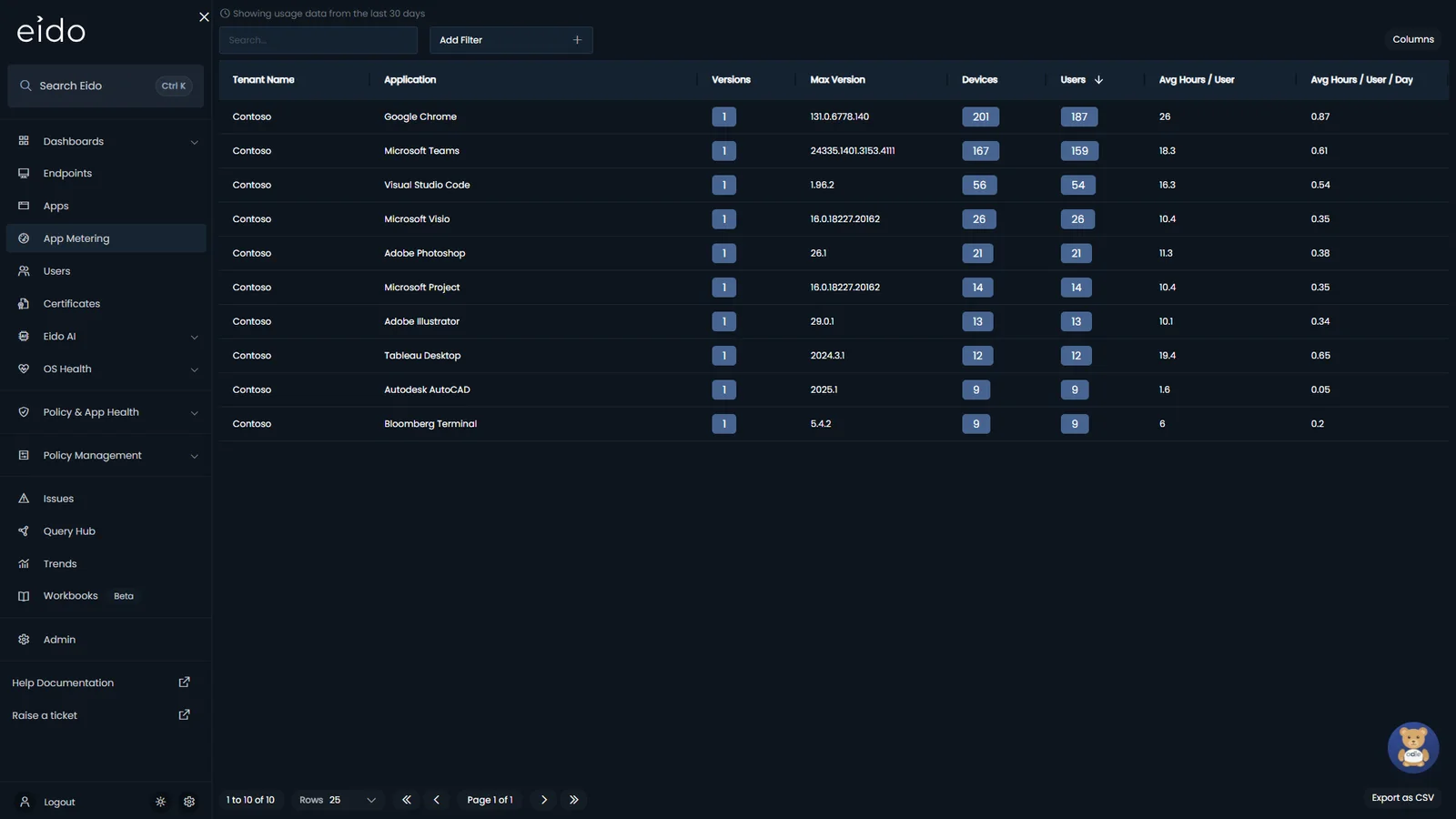
App Metering
Which applications are really used, by whom and for how long.
Read the docs -
No agent
An Intune Remediation reports usage every hour. Already running the Eido Client? It can collect instead.
Read the docs -
Choose what to meter
Pick applications from a gallery grouped by category, and switch each one on or off.
Read the docs -
Per user, per app
Go from an application to its users, devices and versions, over the period you choose.
-
ServiceNow SAM
ServiceNow Software Asset Management reads monthly usage from Eido and sends Eido its reclamation rules.
Read the docs -
Evidence for renewals
Export per-user, per-app usage for finance, procurement and SAM teams.
Every policy change on record, and reversible
A new version of an Intune policy every time it changes, the value of every setting over time, and a way back when a change goes wrong.
Time back. Roll back a bad change in minutes, instead of rebuilding a policy from memory.
- Under the hood
- Backups
- Checked hourly, a version kept whenever settings or assignments change
- History
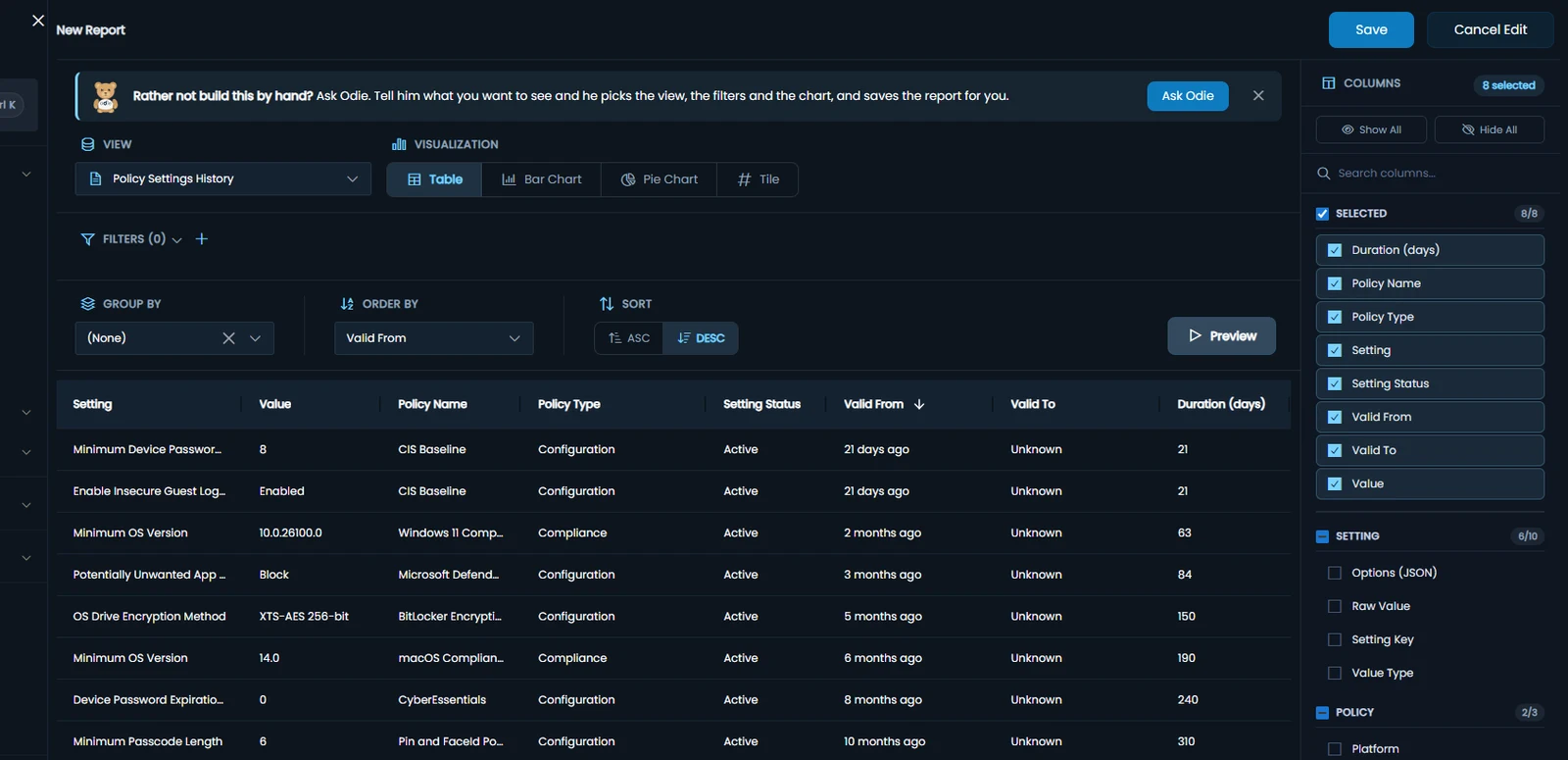
- Per setting, with the date each value took effect and ended
- Restore
- Compliance, configuration, settings catalog, scripts, remediations and update profiles
- Deleted policies
- Kept with their history for 30 days, and a deleted compliance policy can be recreated
- Templates
- Deploy a good policy to your other tenants
- Access
- The one feature that writes to Intune, and only on a tenant linked read-write
-
Policy backups
Compliance, configuration, scripts, update, app protection and Conditional Access policies, checked every hour.
Read the docs -
Setting-level history
See each setting’s value, when it changed and how long it held.
-
See what changed, and restore
Each version against the one before it, settings and assignments, and a restore that can itself be undone.
Read the docs -
Templates across tenants
Turn a good policy into a template and deploy it to your other tenants.
Read the docs -
Intune Changes
A timeline of every policy change made in Intune: who made it, which users and devices it reaches, and whether tickets followed. Needs Eido AI.
Read the docs -
Write access is optional
Link a tenant read-only and Eido never writes to it.
Read the docs
Role-based access, built for enterprises
Give the London service desk London, the VIP team the executives, and each business unit its own devices. Rules on the data itself, enforced by Eido on every query, not by hiding menus.
Time back. Delegate to every support team safely, without building and maintaining Intune scope tags for each one.
- Under the hood
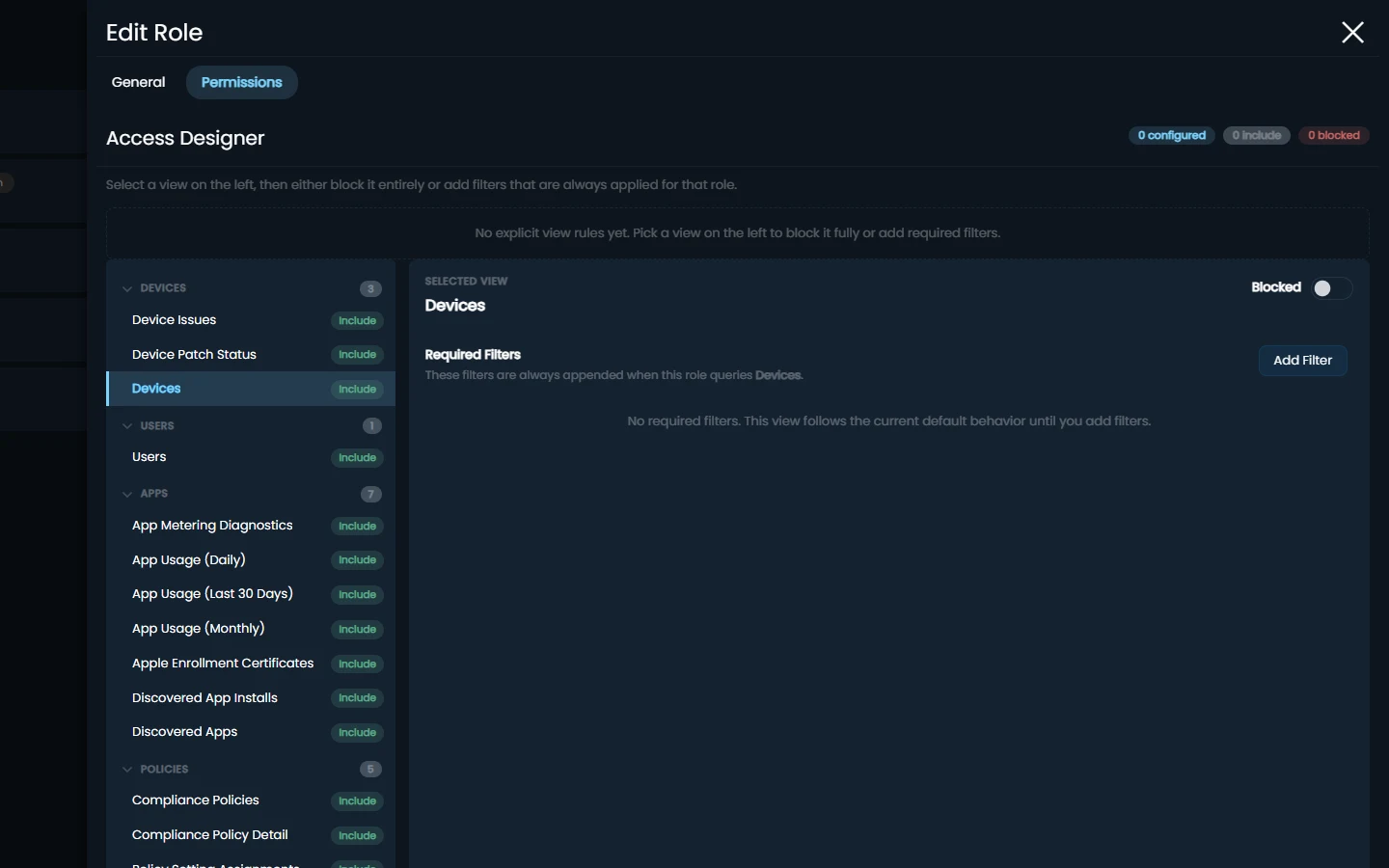
- Rules
- Required filters on any column: department, office, country, OS, device name and more
- Reach
- One filter can follow the role across every view with the same column
- Views
- Include or block each data set, per role
- Assignment
- By an administrator, or by Entra group membership at sign-in
- Scope
- Required filters for a business unit inside a tenant; whole tenants grouped by customer
- Enforcement
- Applied by Eido to every Query Hub query, so a bookmark cannot get round it
-
Required filters
Filters added to everything a person does with a view, on top of their own. They cannot remove them.
Read the docs -
One rule, every view
Filter Intune Tenant or Department once and the role is narrowed across every view with the same column.
Read the docs -
Block whole views
Take a data set away from a role entirely, such as audit logs for the service desk.
Read the docs -
Roles from Entra groups
Let membership of an Entra group decide who holds a role, and create the Eido account at first sign-in.
Read the docs -
Business units and subsidiaries
Narrow a role to one business unit with required filters, or group whole tenants by customer, each with administrators who see only their own.
Read the docs -
Ready for a security review
How sign-in and access work, what Eido reads from your tenant, and how organisations are kept apart.
Read the docs
Example rules
- USA support team Can access Devices where the device name begins with USA, excluding users in the C-Level department
- iOS mobile team Can access Devices running iOS or iPadOS
- VIP support team Can access Users within the C-Level Executives department
- London office support team Can access Devices where the primary user’s office is London
Questions Intune teams ask us
Does Eido replace Intune?
No. Intune remains responsible for device management, policy and configuration. Eido sits alongside it and adds the reporting, real-time device data, software metering and policy history that Intune leaves out.
How long does it take to get started?
Connecting a tenant takes about five minutes, and the out-of-the-box reports and dashboards work straight away. For large organisations, initial setup takes under two hours, and our onboarding team guides you through configuration, custom dashboards and report templates.
What access does Eido need to our tenant?
Reporting, metering and analytics use read-only access to Intune. Policy management is optional, and requires write access so that Eido can set baselines and roll back changes. You choose the access level when you link a tenant. The documentation lists every permission.
Do we have to install an agent?
Not for reporting, patch compliance, policy management, warranty or software metering, which work through Intune itself. Real-time monitoring and the live tools use the Eido Client, an MSI most teams deploy as a Win32 app through Intune.
What network access does the Eido Client need?
Outbound only. The Eido Client accepts no inbound connections. Platform traffic uses HTTPS, and live metrics use Azure IoT connectivity. If the live metrics connection is blocked, the rest of Eido carries on working.
Which platforms does Eido cover?
Reporting and patch compliance cover Windows, macOS, iOS, iPadOS and Android devices managed in Intune. The Eido Client, which provides real-time monitoring and the live tools, and software metering are for Windows.
How is Eido priced?
Per device, per year, on one plan with no add-ons. The price per device falls as your estate grows. See pricing.
See it on your own Intune data
Book a demo and we will go through the parts that matter to you. Or request a free trial and connect your own tenant.