Create and Deploy Basic Wifi profile in Microsoft Intune

Login to Microsoft Endpoint Manager Admin Centre here
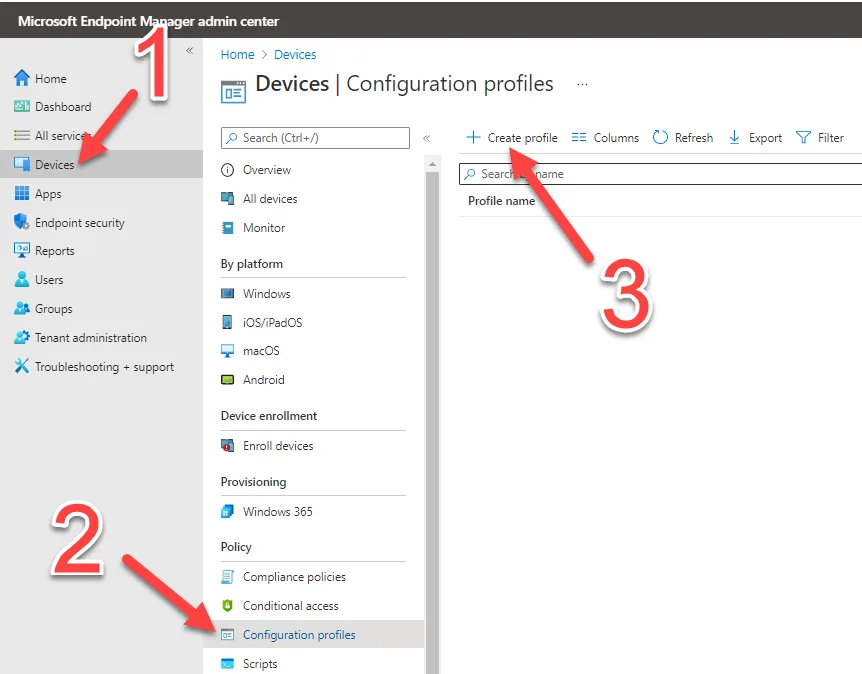
Browse to Select Devices > Configuration profiles > Create profile
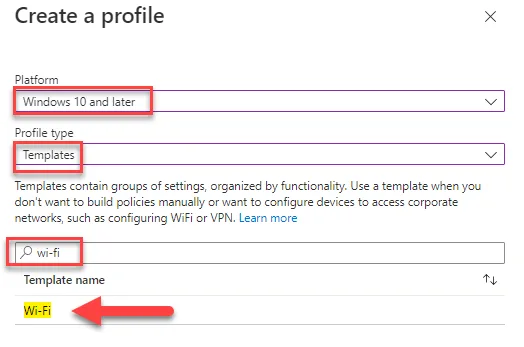
Select the platform, in this case we are choosing Windows 10 and later, choose Templates as profile type and search for Wi-Fi in the available templates
Name this template and proceed to step 2
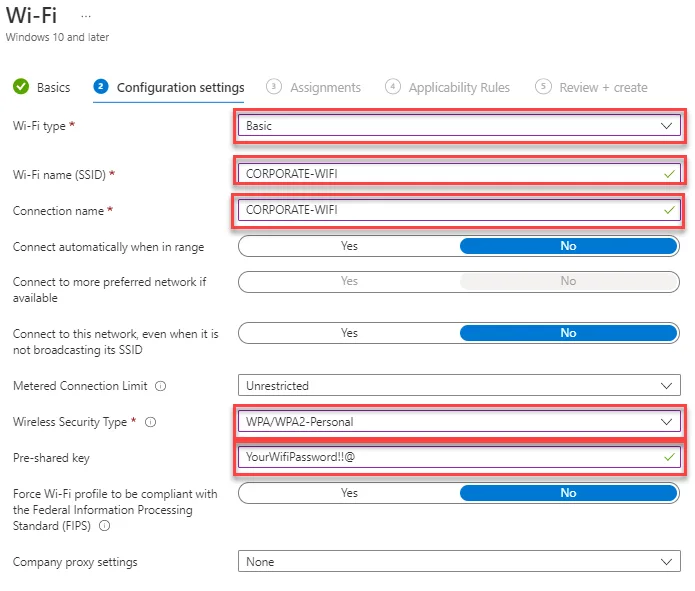
Here is where you configure your Wi-Fi settings
Select Basic for Open / WPA-WPA2-Personal (Password) authentication.
Select Advanced for Enterprise (EAP/PEAP) authentication
Basic
Wi-Fi Type: Basic
Wi-Fi Name: Input the Name (SSID) of the wireless network
Wireless Security Type: Select the Wi-Fi Security type, in this case we have selected WPA/WPA2-Personal
Pre-Shared Key: Input the Wi-Fi Key/Password